
Introduction
Buying a laptop feels confusing when every model looks different, and every store promises “the best deal.” So, what are the types of laptops, and why do they matter? In simple terms, laptops come in different categories based on how you use them—for study, work, gaming, travel, or professional tasks. Each type focuses on a specific balance of performance, portability, battery life, and price.
If you understand these laptop categories, you avoid overspending or ending up with a device that can’t keep up with your needs. This guide explains the main laptop types in clear, everyday language. You’ll learn what each one does well, where it struggles, and who it’s actually for—so you can make a smart choice with confidence.
Why Laptop Types Exist and How They’re Classified
How laptop classifications are defined
Manufacturers don’t create different kinds of laptops just for marketing. Instead, they design them around real usage patterns. For example, a student needs portability and battery life, while a gamer needs strong graphics and cooling. Therefore, laptop classifications focus on form factor, performance level, and mobility.

In addition, operating systems also shape categories. Windows, macOS, and ChromeOS support different software and workflows. As a result, two laptops with similar looks may suit very different users.
Why choosing the wrong laptop type causes problems
Many beginners buy based on brand or discounts alone. However, that often leads to slow performance, poor battery life, or unnecessary weight. For example, a gaming laptop feels frustrating for travel, while a Chromebook can’t run advanced software.
Overall, choosing the right type saves money and prevents daily annoyance. That’s why understanding categories matters before comparing models or prices.
Traditional Laptops vs Modern Laptop Designs
Traditional laptops for everyday use
They feature a fixed keyboard, non-touch display, and balanced specifications. Most run Windows and support a wide range of programs.
Because of this flexibility, they work well for web browsing, documents, video calls, and light multitasking. However, they usually weigh more and offer average battery life.
Modern laptop form factors explained
Modern designs focus on portability and flexibility. Thin-and-light laptops, convertibles, and detachable models reduce weight while improving battery efficiency. In contrast, some modern laptops remove ports or upgrade options to stay slim.
Therefore, modern laptops feel convenient but may require adapters or higher budgets. Understanding this trade-off helps you choose wisely.
Types of Laptops for Students and Education
Student laptops for school and college
Student laptops prioritize affordability, battery life, and ease of use. Many schools in the USA recommend Chromebooks because they handle assignments, research, and online classes smoothly. Traditional laptops also work well for students who need Windows software.
In addition, lightweight designs reduce backpack strain. For most students, strong graphics or premium materials don’t matter as much as reliability.
Best laptop types for study needs
The best laptop type depends on your major. For example, liberal arts students often succeed with Chromebooks or budget notebooks. However, engineering or design students need Windows or macOS laptops with higher performance.
Before buying, always check the software requirements from your school. That step alone prevents costly mistakes.
Ultrabooks and Thin-and-Light Laptops
What makes an ultrabook different
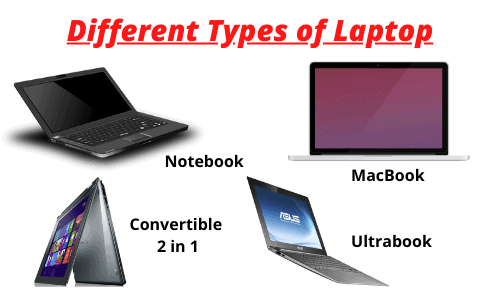
An ultrabook is a thin, lightweight laptop built for speed and portability. It uses solid-state storage, energy-efficient processors, and premium materials. As a result, it starts quickly and lasts longer on battery.
These laptops appeal to professionals and travelers who value convenience. However, they often cost more than standard notebooks.
Differences between ultrabooks and notebooks
Notebooks include many laptop types, while ultrabooks represent a specific premium category. For example, an ultrabook usually weighs under three pounds and offers all-day battery life. A standard notebook may feel heavier but cost less.
Therefore, ultrabooks suit users who move often, while notebooks suit users who work mostly at a desk.
2-in-1 and Convertible Laptop Types
Convertible laptops and detachable designs
Convertible laptops feature hinges that rotate 360 degrees, while detachable laptops remove the keyboard entirely. Both act as laptops and tablets. Touchscreen support makes them popular for note-taking and presentations.
However, hinges and detachable parts add complexity. Cheaper models may feel less durable over time.
Pros and cons of 2-in-1 laptops
These devices offer flexibility and portability. Students and creative users often enjoy sketching or reading in tablet mode. On the other hand, they usually deliver lower performance than traditional laptops at the same price.
If you value versatility over raw power, a 2-in-1 works well. Otherwise, a standard laptop may feel more reliable.
Gaming Laptops and High-Performance Machines
What defines a gaming laptop
Gaming laptops include powerful processors, dedicated graphics cards, and advanced cooling systems. They handle modern games, video editing, and 3D design without slowing down. High-refresh displays improve smoothness and visual clarity.
However, this power increases weight, heat, and noise. Battery life also drops quickly during heavy use.
Are gaming laptops good for everyday use?
Gaming laptops can handle daily tasks easily. However, they often feel bulky and loud for simple work. For example, carrying one to class or a coffee shop feels inconvenient.
Unless you play games or use demanding software, a gaming laptop may feel like overkill.
Business and Office Laptop Categories
Business laptops for professional work
Business laptops focus on durability, security, and comfort. They often include better keyboards, fingerprint readers, and stronger frames. Many also support enterprise security tools.
As a result, they perform reliably during long workdays. Professionals who work remotely or travel often appreciate this stability.
Laptop models and specifications for offices
Office laptops usually balance performance and battery life. They don’t need powerful graphics but require stable processors and sufficient RAM. Windows dominates this category because it supports corporate software.
If your job involves spreadsheets, meetings, and documents, business laptops fit perfectly.
Chromebook and Cloud-Based Laptops
What a Chromebook really is
A Chromebook runs ChromeOS, a lightweight operating system centered around web apps. It starts quickly and updates automatically. Most files sync to cloud storage, reducing maintenance.
Because of this simplicity, Chromebooks feel fast even with modest hardware.
Limitations of ChromeOS laptops
Chromebooks rely heavily on internet access. Advanced desktop software often doesn’t run on ChromeOS. Therefore, creative professionals and programmers may feel limited.
For basic use, however, Chromebooks remain affordable and secure.
Workstation and Professional Laptop Types
Workstation laptops for demanding tasks
Workstation laptops target engineers, architects, and video editors. They support powerful CPUs, professional GPUs, and large memory capacities. These machines handle heavy workloads smoothly.
However, they cost significantly more and weigh more than regular laptops.
Who should consider professional workstation computers
If your income depends on software like AutoCAD or Adobe Premiere, a workstation makes sense. Otherwise, buying one wastes money and portability.
For beginners, workstation laptops rarely provide value.
Rugged and Specialized Laptop Categories
Rugged laptops for harsh environments
Rugged laptops survive dust, drops, and extreme temperatures. Industries like construction, emergency services, and manufacturing rely on them. Reinforced frames and sealed ports protect internal components.
However, rugged laptops feel bulky and expensive.
Who rugged laptops are not for
Most everyday users don’t need this durability. Carrying extra weight and paying higher prices makes little sense for home or office use.
Only choose rugged laptops if your work environment demands it.
Laptop Types Based on Specifications and Features
Processor, RAM, and storage differences
Laptop performance depends on processors, memory, and storage. Intel, AMD, and Apple M-series chips power modern laptops. More RAM improves multitasking, while SSDs boost speed.
For beginners, 8–16 GB RAM and SSD storage provide a smooth experience.
Display size, graphics, and battery life
Display sizes range from 13 to 17 inches. Smaller screens increase portability, while larger screens improve comfort. Integrated graphics suit daily use, while dedicated GPUs suit gaming and creative work.
Battery life varies widely. Thin laptops last longer, while performance laptops drain faster.
How to Choose the Right Laptop Type Step by Step
Step-by-step laptop buying guide by categories
First, list your main tasks—study, work, gaming, or travel. Next, choose the laptop category that matches those tasks. Then, set a realistic budget based on that category.
Finally, compare two or three models instead of dozens. This approach saves time and stress.
Decision tips to avoid overbuying
Don’t pay for features you won’t use. For example, gamers need GPUs, but writers don’t. Likewise, ultra-thin laptops feel great, but only if you move often.
Overall, clarity about your needs matters more than specs.
Trends in Laptop Categories (2025–2026)
Emerging laptop form factors and technology
Laptop designs continue to evolve. AI-assisted processors, ARM-based chips, and foldable screens are gaining attention. Battery efficiency improves every year.
These trends aim to balance performance with portability.
What beginners should know about future laptops?
New technology sounds exciting, but early versions cost more. Beginners should focus on proven designs instead of experimental features.
Waiting for maturity often delivers better value.
FAQ’s
How many laptop types are available today?
Several categories exist, including traditional, ultrabook, gaming, business, Chromebook, workstation, and convertible models.
Which laptop type is best for beginners in the USA?
Most beginners feel comfortable with traditional laptops or Chromebooks due to simplicity and affordability.
Are 2-in-1 laptops durable long-term?
They last well if built properly, but hinges and detachable parts add wear over time.
What are the types of laptops based on performance levels?
Entry-level laptops handle basic tasks, mid-range models support multitasking, and high-performance laptops manage gaming or professional work.
Conclusion
Understanding what are the types of laptops helps you buy with confidence instead of confusion. Each category serves a specific purpose, and no single laptop fits everyone. Focus on how you plan to use your device, choose the category that matches that reality, and compare models within that group. Once you do that, you’ll enjoy your laptop instead of fighting it every day.







2 Comments